



Table of Contents
How to upgrade ChatGPT Pro in India is one of the most searched topics right now — and for a good reason. If you’ve been using ChatGPT for studying, coding, or even daily productivity, you’ve probably wondered what it’s like to use the Pro version everyone talks about. Faster answers, smarter models, file uploads, image generation — it’s tempting, right?
Well, here’s the good news: upgrading to ChatGPT Pro in India is super simple, and in this post, I’ll walk you through every single step — from logging in to paying ₹1 or ₹2 (yes, that tiny charge you see), managing your subscription, and even canceling auto-renew if you change your mind later.
We’ll cover everything — web, Android, and iPhone methods — plus a few secret tips and troubleshooting fixes that most people miss.
Why upgrade to ChatGPT Pro (or ChatGPT Go)?
Think of ChatGPT Pro as your upgraded AI partner. It’s not just about getting faster answers — it’s about getting more done with fewer limits.
Here’s what you unlock when you upgrade:
- Lightning-fast responses even when servers are busy
- Access to GPT-4 Turbo or GPT-5 (depending on rollout)
- Upload and analyze files like PDFs, spreadsheets, and images
- Built-in DALL·E image generation
- Better memory and context across longer chats
- Higher daily message and image limits
- Early access to new tools and features
In short — ChatGPT Pro (or ChatGPT Go in India) gives you the full power of AI without the slowdowns and restrictions of the free version.
And guess what? Starting November 4, 2025, OpenAI is giving Indian users ChatGPT Go free for one full year! So even if you’re curious, this is the perfect time to explore the premium experience.
What you need before upgrading
Before jumping in, make sure you’ve got these ready:
- A valid ChatGPT account (Google, Apple, or email login)
- A payment method — debit/credit card or UPI (for ₹1 or ₹2 verification)
- The latest version of the ChatGPT app (if you’re on Android or iPhone)
- A stable internet connection
That’s it — no complicated setup needed.
How to upgrade ChatGPT Pro on a laptop or desktop (web version)
Let’s start with the easiest way — using your web browser.
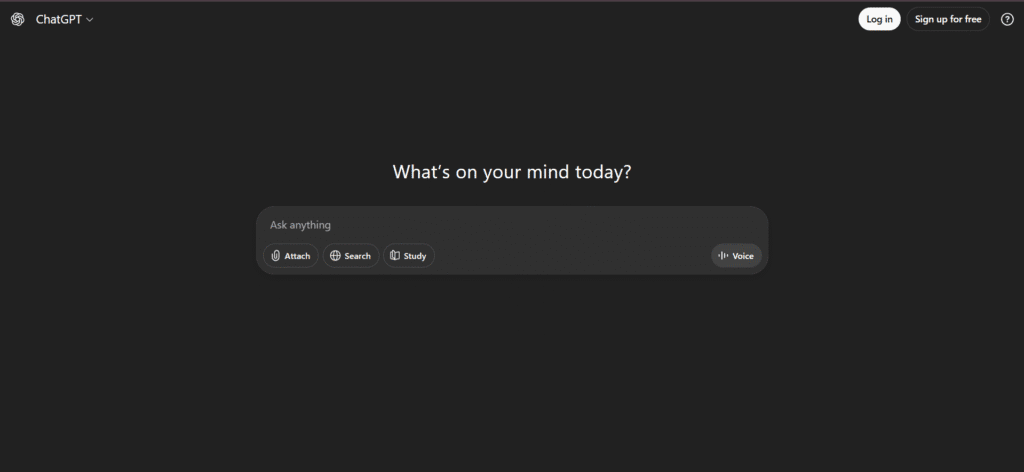
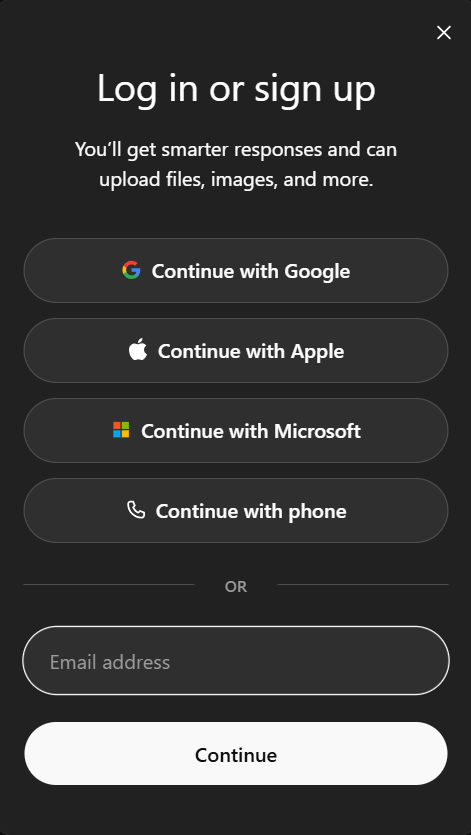
Step 1: Go to ChatGPT and log in
Open chat.openai.com in Chrome or Edge and log in using your Google, Apple, or email account.
Step 2: Open Settings
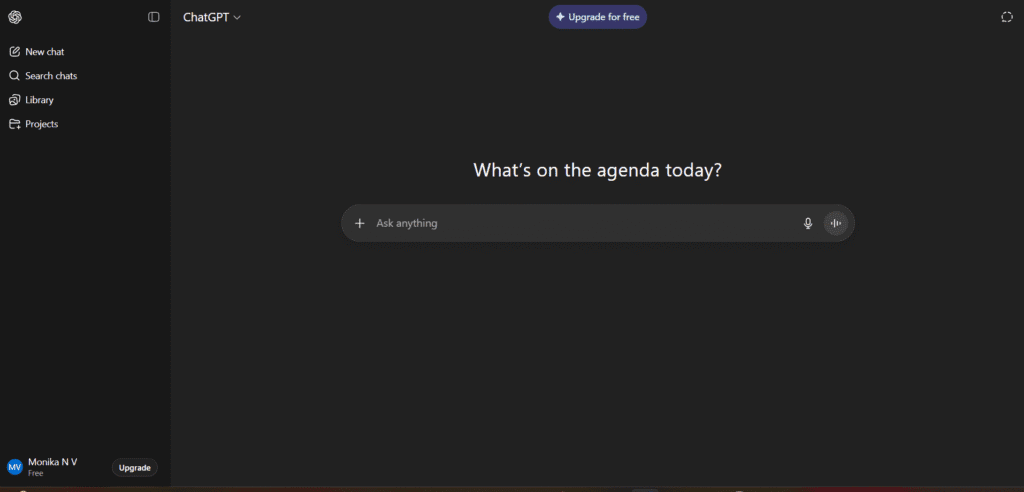
Once you’re inside, look at the bottom-left corner — you’ll see your name or profile icon. Click it, then choose Upgrade Plan.
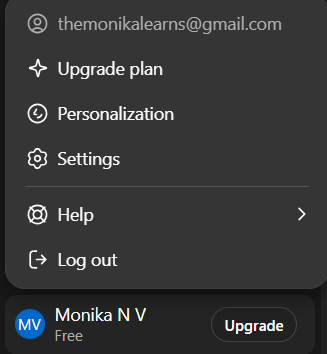
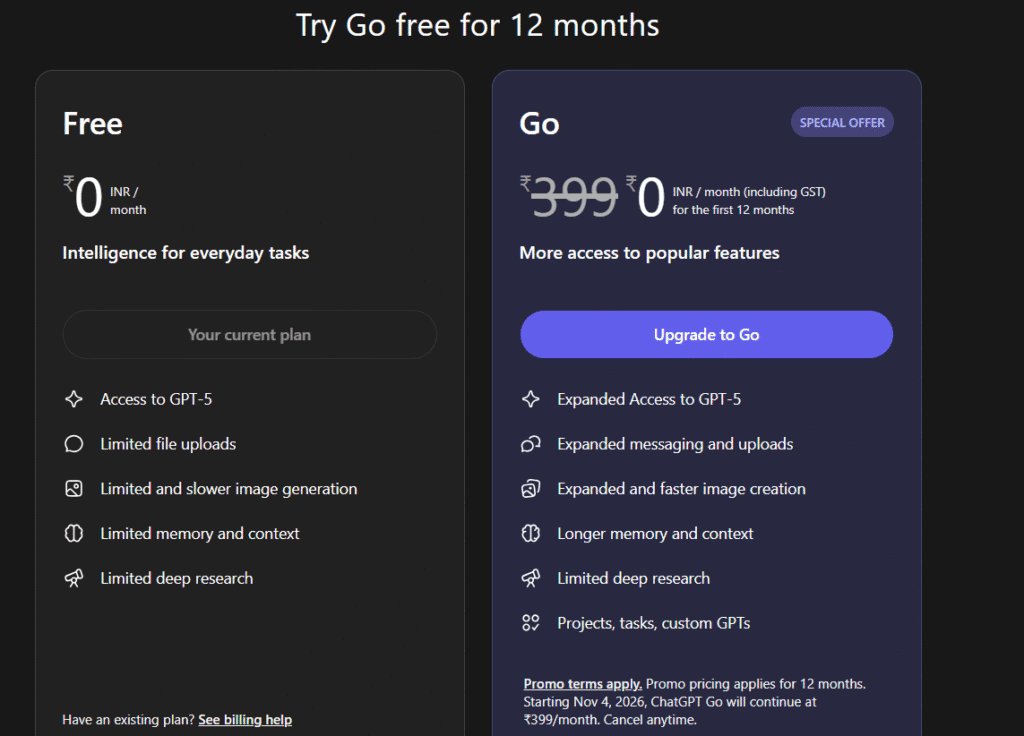
Step 3: Choose “ChatGPT Pro / Go”
You’ll see a page showing the available plan (usually ₹399 per month).
If the 1-year free India offer is live, you’ll instead see an “Activate Free Plan” banner — click that.
Step 4: Add payment method
Even for the free offer, some users might be asked to add a payment method.
Enter your UPI ID or card details. You might see a small ₹1–₹2 verification charge — that’s normal and usually refunded or adjusted later.
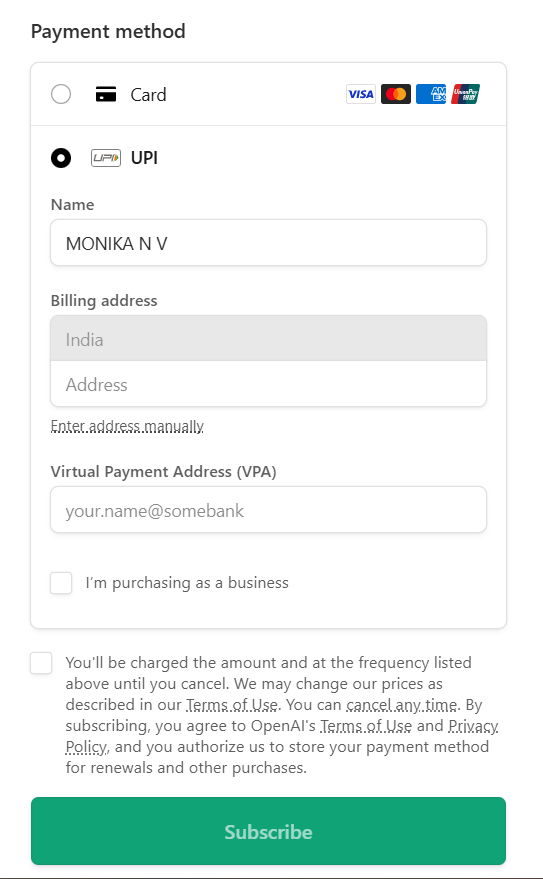
Step 5: Click “Subscribe,” pay ₹2 verification fee, and check your plan
Once you’ve entered your details, click “Subscribe” or “Confirm / Upgrade.”
You may be asked to pay a small ₹1 – ₹2 verification charge — this is just to confirm your payment method (UPI, card, or Google Play).
Don’t worry — this isn’t the actual cost of the plan. It’s a temporary verification fee that’s automatically refunded in a few days.
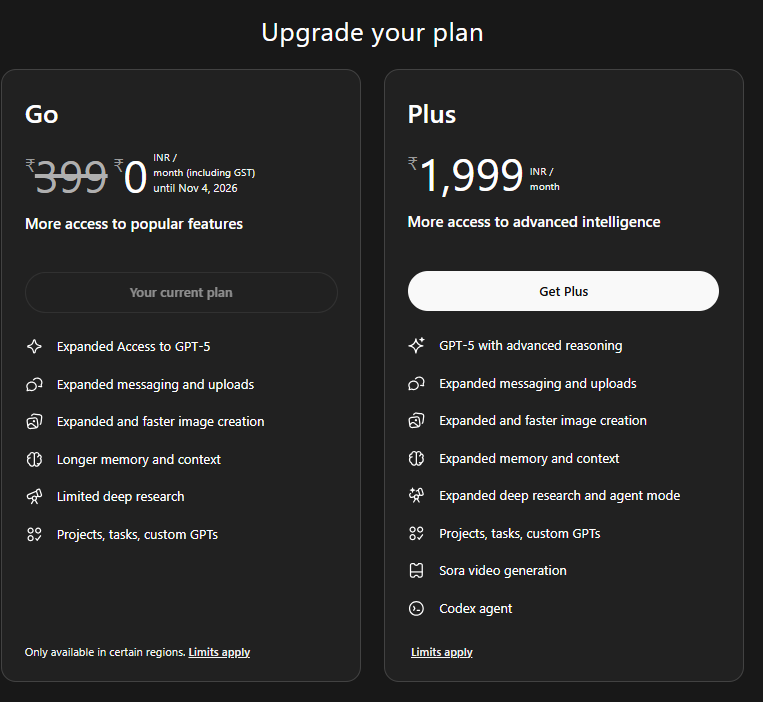
After payment, you’ll be redirected to the ChatGPT dashboard.
You’ll now see a message like “Your current plan: ChatGPT Pro” or “Your current plan: ChatGPT Go.”
That means your upgrade is active — no extra steps needed!
If the page doesn’t refresh automatically, simply go back to the Settings → Upgrade Plan section, and you’ll see your new plan status displayed there.
How to upgrade ChatGPT Pro on Android
If you prefer using ChatGPT on your phone, the Android method is super straightforward.
Step 1: Update the ChatGPT app
Open the Google Play Store, search for “ChatGPT OpenAI,” and hit Update (if available). This ensures you have the latest version that supports upgrades.
Step 2: Log in
Open the app and sign in with your ChatGPT account.
Step 3: Go to Profile → Upgrade to Pro
Tap your profile icon . You’ll see an option that says Upgrade to Pro — tap it.
Step 4: Confirm via Google Play
You’ll be redirected to the Google Play billing screen.
Choose your payment method (UPI, card, etc.) and tap Subscribe.
Google Play might place a small ₹1/₹2 hold — that’s just verification.
Step 5: Done
Once confirmed, your ChatGPT Pro access activates instantly.
About that ₹1 or ₹2 charge — don’t worry!
A lot of users panic when they see a tiny ₹1 or ₹2 deducted after upgrading.
Relax — this isn’t the real cost of the plan. It’s simply a verification step used by Google Play, Apple Billing, or OpenAI’s payment processor to confirm that your payment method works.
This amount is automatically refunded or adjusted — you’ll usually see it disappear in a few days.
So if you notice ₹1 or ₹2 missing, don’t dispute it — it’s normal and temporary.
How to cancel auto-renew anytime
Upgrading doesn’t lock you in forever. You can cancel auto-renew in a few clicks.
On Web
- Go to chat.openai.com
- Click your profile → Settings → Manage Subscription
- Hit Cancel Plan
You’ll still keep Pro access until your current billing month ends.
On Android (Google Play)
- Open Google Play Store
- Tap your profile → Payments & subscriptions → Subscriptions
- Choose ChatGPT and tap Cancel Subscription
On iPhone (Apple)
- Go to Settings → Apple ID → Subscriptions
- Tap ChatGPT → Cancel Subscription
Done! You can re-subscribe anytime if you change your mind.
Cancel ChatGPT AutoPay from UPI Apps (PhonePe / Paytm)
If you want to make sure the auto-payment is completely stopped from your UPI app, you can manually cancel the mandate using these steps
PhonePe
- Open PhonePe
- Tap Manage Payments on the home screen → Click View All
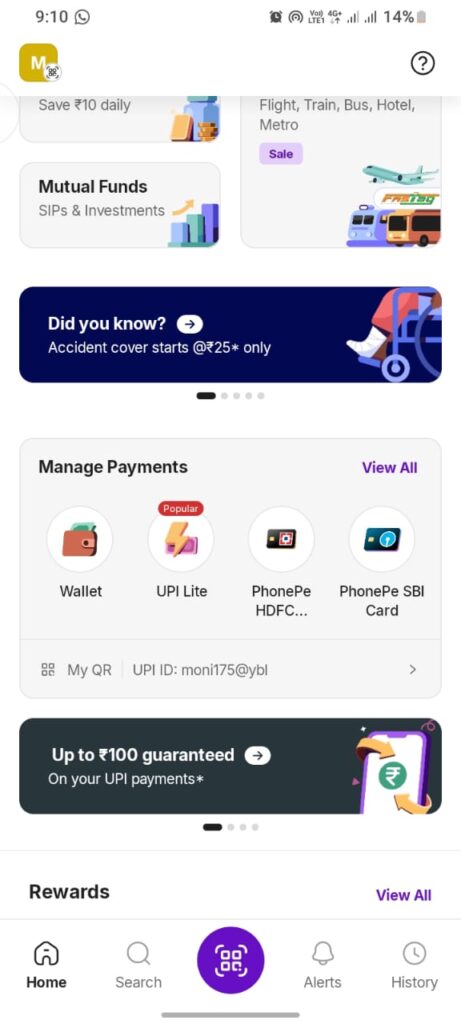
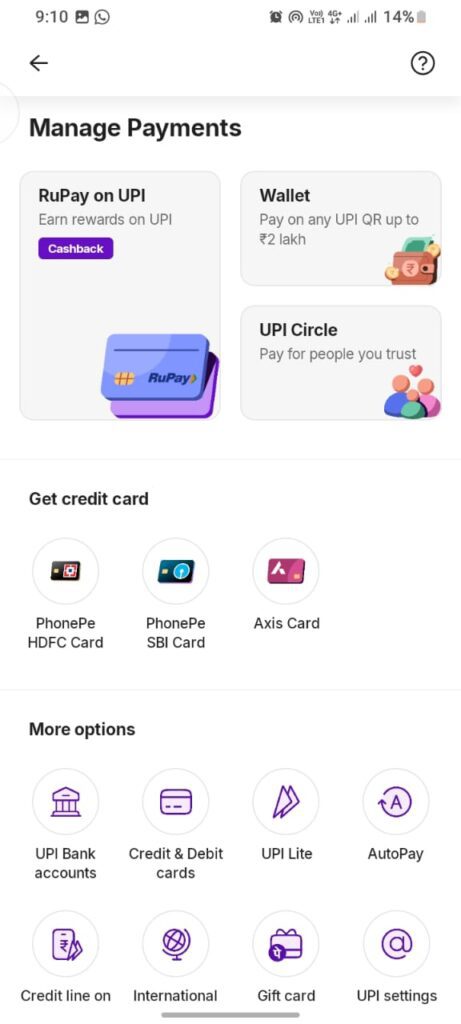
3.In the Manage Payments screen, you’ll see several options — tap AutoPay
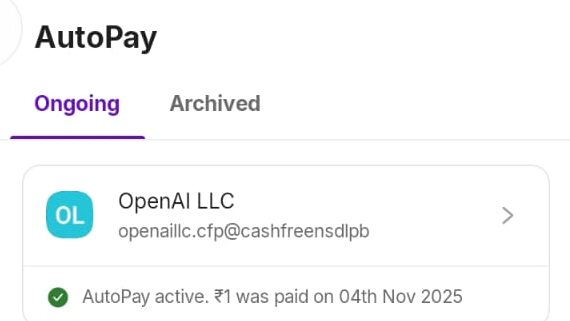
4. Look for the entry labeled OpenAI LLC (or sometimes shown as ChatGPT / OpenAI (Stripe))
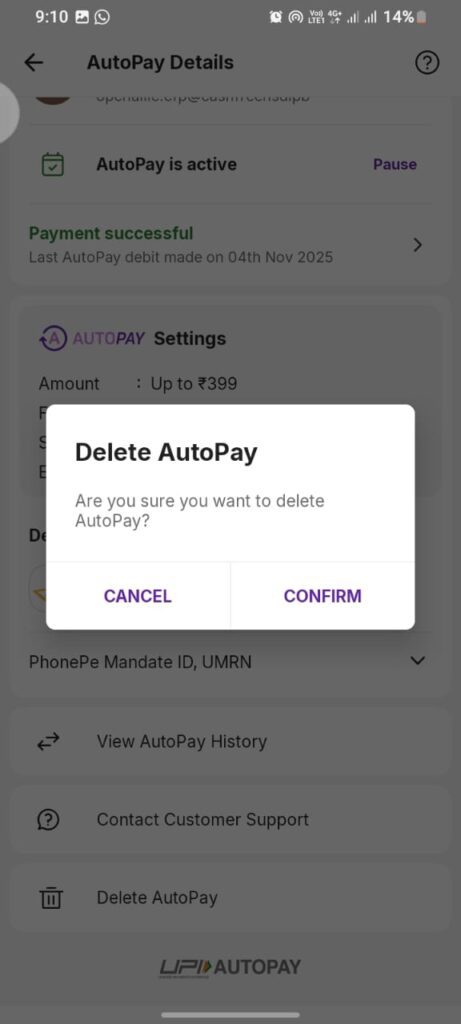
5.Tap it → then tap Delete
Paytm
- Open Paytm
- Tap Profile → Automatic Payments
- Look for ChatGPT / OpenAI (Stripe)
- Tap Cancel
Troubleshooting: common issues and quick fixes
| Issue | What to do |
|---|---|
| Upgrade button missing | Update the app or clear browser cache; make sure your account region is India. |
| Payment failed | Try a different method — UPI usually works best; enable online transactions on your card. |
| Still on free plan after paying | Log out → log in; check your receipt; wait a few minutes. |
| App crashes during upgrade | Clear cache / reinstall the app. |
| Charged even though free offer active | Contact OpenAI Support with transaction ID — they usually adjust or refund. |
Stay safe while upgrading
- Only use official channels — the ChatGPT website or verified app.
- Avoid third-party links or “early access” sites promising free upgrades.
- Never share OTPs or card PINs.
- Keep your email and phone number verified for recovery.
ChatGPT Go free for one year — what it means for India
The November 2025 offer is huge. OpenAI officially announced that Indian users get ChatGPT Go (worth ₹399/month) completely free for 12 months.
This means you’ll soon be able to experience Pro-level features without paying anything.
Here’s the summary:
- Start Date: November 4, 2025
- Duration: 1 year (free till Nov 2026)
- Region: India-only
- Value: ₹399 × 12 = ₹4,788 saved!
- How to activate: When it launches, you’ll see a banner inside ChatGPT that says “Activate ChatGPT Go Free for 1 Year.” Click it and you’re in.
So even if you upgrade now, you’ll be ready for a seamless transition when the free offer kicks in.
Who benefits most from upgrading
Students: Your personal study partner — explains concepts, writes essays, even checks grammar.
Developers: Debug code, generate snippets, and learn new languages faster.
Creators & Marketers: Generate blog posts, captions, and graphics using DALL·E without switching tools.
Researchers: Summarize papers and analyze data.
Basically, anyone who wants to work smarter benefits from ChatGPT Pro.
Frequently asked questions
1. Is ChatGPT Go the same as ChatGPT Pro?
Yes, in India the “ChatGPT Go” plan is the local version of the Pro/Plus tier — same features, just regional pricing.
Q2. Will I be charged during the free year?
No, the 12-month period is completely free, though you might still need to verify a payment method.
Q3. Can I cancel auto-renew anytime?
Absolutely. You can cancel directly through ChatGPT settings or your app store.
Q4. I paid ₹1 or ₹2 — is that a scam?
Not at all. It’s a temporary verification charge and usually disappears automatically.
Q5. Can I use the same account on laptop and phone?
Yes! Your Pro access syncs across all your devices as long as you use the same account.
Final thoughts
So that’s everything you need to know about how to upgrade ChatGPT Pro in India — from login to payment, from activation to cancellation.
If you’ve been using the free version and always wished for more speed, longer chats, or file uploads, upgrading is totally worth it. And with the 1-year free ChatGPT Go offer rolling out in India, there’s really no reason not to try it.
Whether you’re a student preparing notes, a developer writing code, or a content creator building your brand — this upgrade is going to change the way you learn, work, and create.
So go ahead — log in, hit Upgrade to Pro, and explore the full power of AI.
Your smarter workflow starts today.
Source
- OpenAI Official Blog & Help Center
Image Source: ChatGPT official screenshots (OpenAI platform UI)
You May Also Like
If you found this blog interesting, you might enjoy exploring more stories, tips, and insights in our