



Table of Contents
Introduction
NumPy for Beginners is the ultimate starting point for anyone who wants to learn data science, machine learning, or AI using Python.
But what exactly is NumPy — and why do so many developers and data scientists swear by it?
In this beginner-friendly guide — “NumPy for Beginners: The Complete Guide to Arrays in Python (2025)” — you’ll learn everything you need to know to start using NumPy confidently:
- What NumPy is
- How to install it
- How arrays work
- Common functions
- Real-world examples and coding exercises
By the end, you’ll be able to create, manipulate, and analyze arrays like a pro.
Let’s dive in
What Is NumPy?
NumPy stands for Numerical Python.
It’s a powerful open-source library that adds support for multi-dimensional arrays and mathematical operations in Python.
In simple terms, NumPy makes Python super fast for working with numbers, matrices, and data — especially compared to normal Python lists.
Quick Example
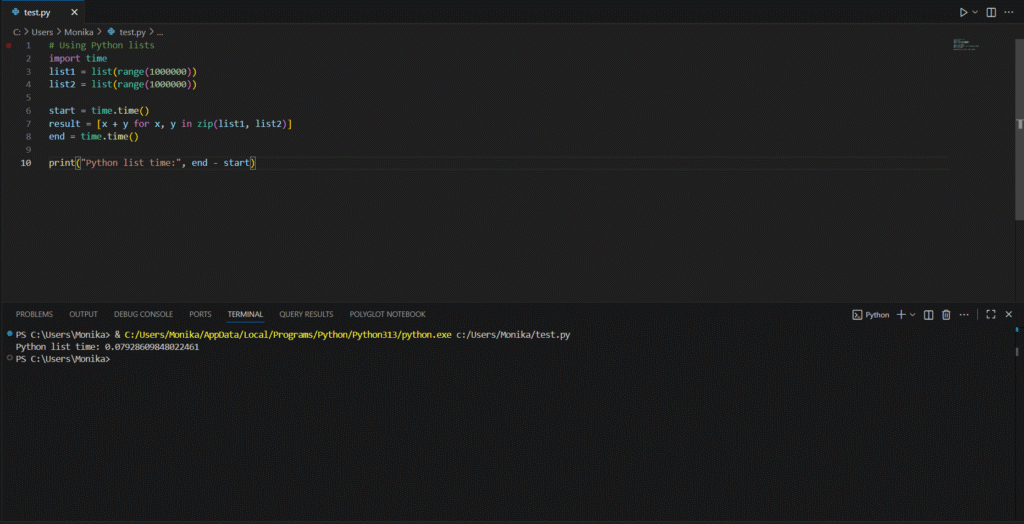
Let’s compare normal Python vs NumPy:
# Using Python lists
import time
list1 = list(range(1000000))
list2 = list(range(1000000))

start = time.time()
result = [x + y for x, y in zip(list1, list2)]
end = time.time()

print("Python list time:", end - start)
Now try the same with NumPy:
import numpy as np
import time
arr1 = np.arange(1000000)
arr2 = np.arange(1000000)

start = time.time()
result = arr1 + arr2
end = time.time()

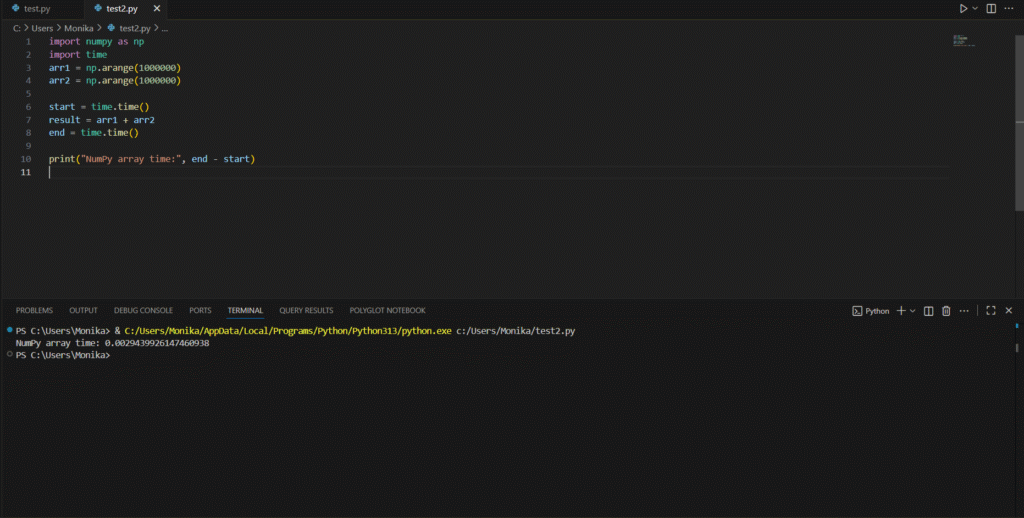
print("NumPy array time:", end - start)
You’ll notice NumPy is 10x to 100x faster — that’s because it’s built in C and optimized for vectorized operations.
Installing NumPy
Before using NumPy, install it via pip (Python’s package manager):
pip install numpy
To verify installation:
import numpy
print(numpy.__version__)
You can also import it using the alias np — this is standard practice:
import numpy as np
Understanding NumPy Arrays
The heart of NumPy is the ndarray (n-dimensional array).
Unlike Python lists, NumPy arrays:
- Store data in fixed types (like int, float)
- Support vectorized operations (no loops needed)
- Are much faster and memory efficient
Creating Arrays
There are several ways to create arrays in NumPy:
1. From a Python List
import numpy as np
arr = np.array([1, 2, 3, 4, 5])
print(arr)
Output:
[1 2 3 4 5]
2. Multi-Dimensional Array
arr2D = np.array([[1, 2, 3], [4, 5, 6]])
print(arr2D)
Output:
[[1 2 3]
 [4 5 6]]
3. Using Built-in Functions
np.zeros((3, 3))    # 3x3 matrix of zeros
np.ones((2, 2))     # 2x2 matrix of ones
np.arange(0, 10, 2) # [0, 2, 4, 6, 8]
np.linspace(0, 1, 5) # [0. , 0.25, 0.5 , 0.75, 1.]
Basic Array Operations
NumPy allows you to perform mathematical operations directly on arrays — no loops!
a = np.array([10, 20, 30, 40])
b = np.array([1, 2, 3, 4])

print(a + b)   # [11 22 33 44]
print(a - b)   # [9 18 27 36]
print(a * b)   # [10 40 90 160]
print(a / b)   # [10. 10. 10. 10.]
Common NumPy Operations
| Operation | Example | Output |
|---|---|---|
| Sum | np.sum(a) | 100 |
| Mean | np.mean(a) | 25.0 |
| Max / Min | np.max(a) / np.min(a) | 40 / 10 |
| Standard Deviation | np.std(a) | 11.18 |
| Square Root | np.sqrt(a) | [3.16, 4.47, 5.47, 6.32] |
Indexing & Slicing in NumPy
NumPy arrays support slicing just like Python lists — but faster and more flexible.
arr = np.array([10, 20, 30, 40, 50])
print(arr[1:4])   # [20 30 40]
print(arr[-1])    # 50
For 2D arrays:
matrix = np.array([[1,2,3],[4,5,6],[7,8,9]])
print(matrix[0, 2])   # 3
print(matrix[1:, 1:]) # [[5,6],[8,9]]
Array Shape and Reshaping
Reshaping allows you to change the dimensions of an array.
arr = np.arange(1, 10)
reshaped = arr.reshape(3, 3)
print(reshaped)
Output:
[[1 2 3]
 [4 5 6]
 [7 8 9]]
To flatten:
reshaped.flatten()
# [1 2 3 4 5 6 7 8 9]
Combining & Splitting Arrays
a = np.array([1,2,3])
b = np.array([4,5,6])

# Combine
print(np.concatenate((a, b)))  # [1 2 3 4 5 6]

# Split
arr = np.array([1,2,3,4,5,6])
print(np.split(arr, 3))  # [array([1,2]), array([3,4]), array([5,6])]
Working with Random Numbers
The numpy.random module is powerful for simulations, games, or ML dataset generation.
import numpy as np

np.random.rand(3)          # Random floats between 0–1
np.random.randint(1, 10, 5) # Random integers between 1–9
np.random.randn(3, 3)       # Normal distribution
You can also set a seed for reproducibility:
np.random.seed(42)
print(np.random.randint(0, 10, 3))
NumPy with Mathematical Functions
NumPy has built-in math functions for fast computation:
angles = np.array([0, 30, 45, 60, 90])
radians = np.deg2rad(angles)

print(np.sin(radians))
print(np.cos(radians))
print(np.tan(radians))
Broadcasting Explained
Broadcasting allows operations between arrays of different shapes.
Example:
a = np.array([1,2,3])
b = 2
print(a * b)  # [2 4 6]
Here, b is a scalar, but NumPy automatically “stretches” it to match a.
This makes complex math easier and faster without loops.
Useful NumPy Functions to Remember
| Function | Purpose |
|---|---|
np.arange(start, stop, step) | Create a sequence of numbers |
np.linspace(start, stop, num) | Evenly spaced numbers |
np.eye(n) | Identity matrix |
np.dot(a, b) | Matrix multiplication |
np.unique(a) | Unique elements |
np.sort(a) | Sort array |
np.where(condition) | Find indices matching condition |
np.isnan(a) | Detect NaN values |
Real-World Example: Data Analysis with NumPy
Let’s analyze a small dataset using NumPy arrays.
import numpy as np

data = np.array([23, 45, 12, 67, 34, 89, 54, 29, 39, 41])

print("Mean:", np.mean(data))
print("Median:", np.median(data))
print("Standard Deviation:", np.std(data))
print("Maximum:", np.max(data))
print("Minimum:", np.min(data))
Output:
Mean: 43.3
Median: 40.0
Standard Deviation: 22.0
Maximum: 89
Minimum: 12
This simple example shows how NumPy makes data analysis lightning-fast — no loops, just clean math.
Common Mistakes Beginners Make
Mistake 1: Using Python lists for math operations
[1,2,3] * 2 # Output: [1,2,3,1,2,3]
Use NumPy arrays:
np.array([1,2,3]) * 2 # Output: [2,4,6]
Mistake 2: Forgetting to import NumPy as np
Always use:
import numpy as np
Mistake 3: Not checking array shape before matrix multiplication
Use:
a.shape, b.shape
before calling:
np.dot(a, b)
Why You Should Learn NumPy in 2025
NumPy remains one of the core foundations of Python programming because:
- It’s the base layer for popular libraries like Pandas, TensorFlow, scikit-learn, and OpenCV.
- It powers data preprocessing, machine learning, mathematical modeling, and scientific computation.
- Every AI or ML framework internally depends on NumPy arrays.
So even if you later move to advanced tools — understanding NumPy will make everything else easier.
Final Thoughts
Learning NumPy is like learning the alphabet of Data Science — once you know it, everything else becomes easier.
It’s simple, fast, and essential for anyone working with data, AI, or Python-based projects.
Start small, experiment with arrays, and soon you’ll be building machine learning models with confidence!
“NumPy makes Python powerful. You make it meaningful.”
Recommended Reading
You May Also Like
If you found this blog interesting, you might enjoy exploring more stories, tips, and insights in our